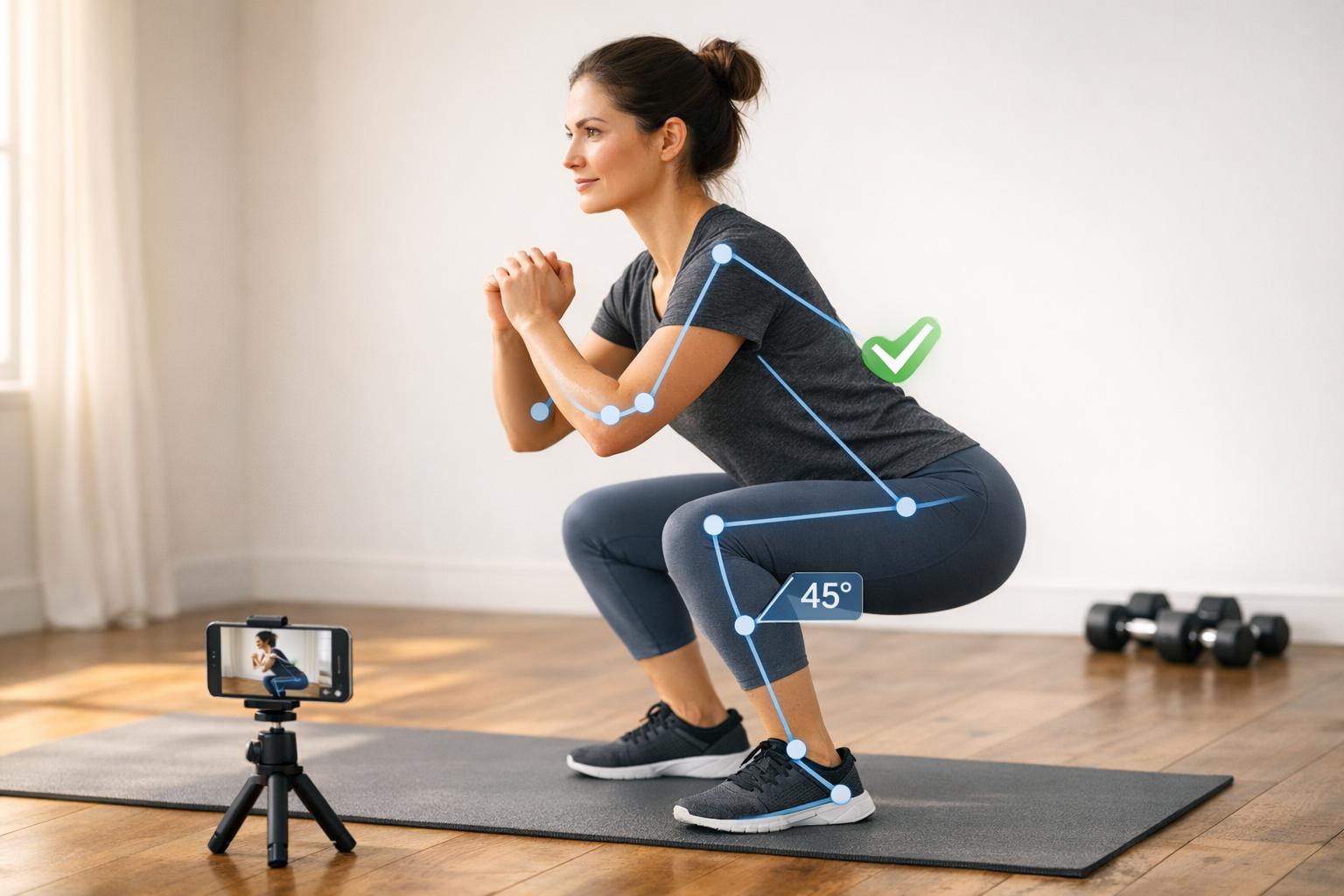
How Pose Estimation Powers Real-Time Form Feedback
Pose estimation uses AI to track your body's movements through video, offering real-time feedback on exercise form. By analyzing joint angles and movement patterns, it helps prevent injuries and improve workout efficiency. Tools like MediaPipe Pose map 33 body keypoints, allowing systems like CueForm AI to deliver actionable corrections in exercises like squats, deadlifts, and bench presses. On-device processing ensures feedback is nearly instant, avoiding delays common with cloud-based systems. This technology is transforming fitness by providing precise, coach-like guidance accessible to anyone with a smartphone.
Key points:
- Tracks body movements via AI for exercise form analysis.
- Provides real-time feedback to improve safety and effectiveness.
- Works on standard devices with low latency for quick corrections.
- Tailors feedback to individual biomechanics and lifting styles.
- Helps identify and correct form issues like knee valgus or back rounding.
This blend of precision and accessibility makes AI-powered tools a game-changer for lifters aiming to refine their technique and reduce injury risks.
AI Pose Estimation with Python and MediaPipe | Plus AI Gym Tracker Project
How Pose Estimation Works
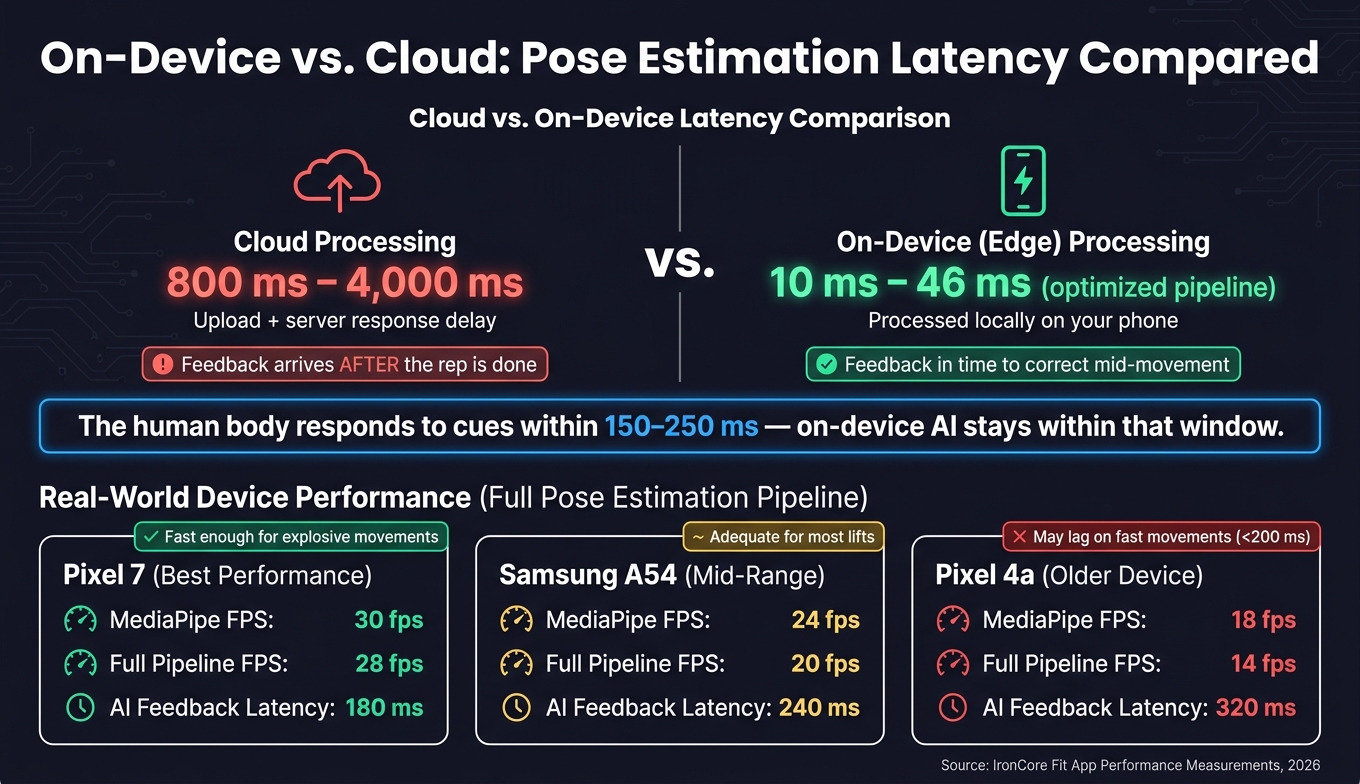
On-Device vs Cloud Pose Estimation: Latency & Device Performance
Detecting Body Keypoints for Analysis
Pose estimation begins by creating a skeletal map of your body from video footage. This involves a two-step process: first, the system identifies your position within the frame, and then it maps specific body landmarks using a skeletal framework [1]. These landmarks - such as shoulders, elbows, wrists, hips, knees, and ankles - are assigned X, Y, and Z coordinates, along with a visibility score that indicates how clearly they are detected. For example, if you're filming a squat from the side and one knee is hidden behind the other leg, the system marks that knee as low-confidence instead of estimating its position. Once these keypoints are identified, the system uses the data to provide meaningful insights about your movements.
From Video Input to Feedback Output
Before extracting landmarks, raw video frames go through pre-processing steps like noise reduction and contrast adjustments to ensure consistent performance, even in challenging lighting conditions [5].
After landmarks are identified, the system calculates joint angles by analyzing the relationships between keypoints. For instance, it might measure the angle formed by your hip, knee, and ankle to assess squat depth [2]. These angles are then compared to thresholds specific to each exercise. Take a bicep curl: the system might require your elbow to extend beyond 160° at the bottom and flex below 50° at the top to count as a valid repetition [1]. A state machine monitors the "UP" and "DOWN" phases of your movement, while a weighted sliding average smooths data across frames to reduce jitter [2][5].
This level of precision enables the system to provide real-time corrections with minimal delay.
Why Low Latency Matters for Real-Time Feedback
To deliver actionable feedback, minimizing latency is key. The body responds to cues within 150–250 milliseconds, so any delay in processing can impact the effectiveness of corrections [6]. Cloud-based systems often create significant delays - uploading video to a remote server and waiting for a response can take anywhere from 800 ms to 4,000 ms [6].
"By the time the cloud server sends the 'Keep your back straight' warning back to the phone, the user has already finished the rep and potentially injured themselves." - MindRind [3]
On-device (edge) processing, on the other hand, dramatically reduces latency. Optimized pipelines can cut delays to just 10–46 ms [6]. The table below compares performance across several devices running a full pose estimation pipeline:
| Device | MediaPipe FPS | Full Pipeline FPS | AI Feedback Latency |
|---|---|---|---|
| Pixel 7 | 30 fps | 28 fps | 180 ms |
| Samsung A54 | 24 fps | 20 fps | 240 ms |
| Pixel 4a | 18 fps | 14 fps | 320 ms |
(Source: Performance measurements for IronCore Fit app, 2026) [2]
For example, the Pixel 7 delivers feedback in just 180 ms - fast enough to help you adjust mid-movement. However, older devices like the Pixel 4a, with a 320 ms delay, might struggle to keep up with quicker, explosive movements that can last less than 200 ms [6].
Key Metrics Used to Evaluate Strength Training Form
Which Body Landmarks Matter Most in Strength Training
The significance of specific joints changes depending on the lift being performed. For example, squats emphasize monitoring the hips, knees, ankles, and heels to identify critical movement patterns. Deadlifts, on the other hand, focus on hip hinge mechanics, spinal alignment, and the lockout position. Meanwhile, bench press evaluations prioritize shoulder blade retraction, elbow positioning, and the precise point where the bar touches the chest [4].
In addition to tracking body landmarks, AI systems also follow the barbell’s movement. Ideally, the bar should travel in a nearly vertical path over the mid-foot. Any deviation from this path could indicate balance or technique issues that might not be obvious to the naked eye [7].
| Exercise | Key Landmarks Tracked | Primary Metrics Evaluated |
|---|---|---|
| Squat | Hips, Knees, Ankles, Heels, Bar | Depth, knee tracking, bar path, torso angle |
| Bench Press | Shoulders, Elbows, Bar | Bar path consistency, shoulder blade retraction, touch point |
| Deadlift | Hips, Back/Spine, Bar | Hip hinge mechanics, lockout analysis, back curvature |
These detailed measurements transform raw data into actionable corrections tailored to each exercise.
Reading Joint Angles and Movement Patterns
After identifying key landmarks, the system calculates joint angles to assess movement quality. For instance, in a squat, it measures the angle at the knee by using three points: the hip, knee, and ankle [2]. Achieving a full squat typically involves at least 120° of hip flexion and 15–20° of ankle dorsiflexion [7].
The system also tracks the torso angle by analyzing the relative positions of the head, shoulders, and hips. This is crucial for spotting issues like lumbar flexion - commonly known as "butt wink" - where the lower back rounds at the bottom of a squat, shifting stress from muscles to passive ligaments [7]. Similarly, it identifies knee valgus, where the knees collapse inward, by comparing the kneecap’s alignment with the toes [7].
Turning Keypoint Data into Actionable Movement Rules
Using the metrics above, the system translates raw angle data into specific movement cues. For instance, if the knee angle in a squat remains above 90° at the bottom, the system might prompt a "go deeper" cue [2]. For a parallel squat, the hip crease must dip below the top of the knee; if this doesn’t happen, the system flags the rep as incomplete [7].
"A proper squat keeps the knee angle above ~90°. Simple geometry, powerful feedback." - DEV Community [2]
Similarly, the system detects errors like heels lifting off the ground or the kneecap drifting inward past the second toe. When these issues arise, it provides immediate corrective cues to address weight distribution or knee alignment [7]. These rules, rooted in biomechanical research, allow for precise, frame-by-frame feedback that even experienced human coaches might struggle to provide consistently.
How Real-Time Feedback Is Generated and Delivered
Comparing Live Motion Against Ideal Movement Thresholds
Once the system calculates joint angles and tracks body landmarks, it uses predefined thresholds tailored to each exercise. These thresholds define the optimal range of motion for proper form. The system processes video at 30–60 FPS on standard devices, evaluating the positions of key landmarks against these thresholds in every frame [1]. If a movement exceeds the set range, an error is flagged. Each exercise has its own specific thresholds to ensure the feedback is relevant to the movement being performed.
Timing Feedback So It Helps Rather Than Distracts
After defining the thresholds, the next step is ensuring feedback is delivered at the right moment. Interrupting a lifter mid-rep, especially during heavy lifts, can disrupt focus. To avoid this, the system provides corrections for the next rep instead of intervening during the current one.
This creates a continuous cycle: the AI analyzes the completed set, prioritizes corrections, and delivers them during the rest period. This way, lifters can focus on one or two adjustments for their next set. More detailed reports, including bar path analysis, are reviewed after the workout, allowing for thoughtful technique improvements in future sessions [4].
"Clear 'do this next rep' guidance - what to change, why it matters, and what it should feel like." - CueForm AI [4]
Ways Feedback Is Delivered to the Lifter
Once the feedback timing is optimized, the method of delivery ensures the lifter receives actionable and easy-to-understand guidance. Feedback is provided through visual overlays, structured reports, and interactive AI chat, each serving a specific purpose.
Visual overlays place corrections - like knee valgus or bar path deviations - directly on video playback. This lets lifters see exactly where a movement went off track [4].
"See what the AI actually identified - issues and metrics - so every cue feels grounded and explainable." - CueForm AI [4]
Structured written reports prioritize key corrections, explaining why each issue matters and describing how the corrected movement should feel. This approach keeps the information manageable and actionable. Meanwhile, interactive AI chat allows lifters to ask follow-up questions, such as "What should this feel like in my hips?" This turns technical data into practical advice that can be applied during rest periods.
How Training Data Shapes Pose Estimation Accuracy
The effectiveness of a pose estimation model heavily depends on the quality and variety of its training data. If a dataset is limited to images of fit athletes in ideal studio conditions, the model may struggle in real-world environments like dimly lit garage gyms or with users wearing different types of clothing. Diverse training data is critical - it’s what separates a model that works well in controlled settings from one that can handle the unpredictability of everyday scenarios. This diversity challenge includes not just lighting but also variations in body types and recording setups.
Accounting for Different Body Types and Lifting Styles
Body types and lifting styles vary widely, and so do recording angles. A model trained on a narrow range of body types might apply thresholds that don’t work for everyone. For example, studies on monocular pose estimation reveal that knee flexion errors can range from 9.3° to 25.8°, depending on the model and the environment [9]. That’s a significant margin of error, one that could lead to inaccurate feedback for users.
To combat this, high-quality training datasets must include a broad spectrum of body proportions, camera placements, distances, and lighting setups. It’s also essential to train models on examples of both correct and incorrect form - not just flawless textbook movements. For instance, the Isometric-Multiclass Dataset (IMCD), introduced in 2025, features over 3,600 video clips of six poses, complete with examples of proper and improper form to improve diagnostic precision [8]. Additionally, incorporating diverse camera angles - whether the camera is on the floor, a shelf, or positioned diagonally - helps the model adapt to a variety of visual inputs.
Balancing Accuracy, False Positives, and Missed Detections
Even with diverse training data, errors are inevitable. The key is managing these errors effectively. False positives, where the system flags a non-existent form issue, can frustrate users and shake their confidence in the tool. On the other hand, missed detections - failing to catch actual mistakes - defeat the purpose of the model.
One way to address this is through confidence thresholding. Each keypoint in the model is assigned a confidence score, and scores below 0.7 are ignored to avoid using unreliable data for joint angle calculations [2]. Another method is temporal filtering. Instead of triggering an alert the moment an issue is detected, the system waits for the problem to persist for more than 2 seconds before flagging it [2]. This delay helps filter out brief glitches while still catching real errors. These strategies, combined with diverse training data, are essential for delivering accurate, real-time feedback during workouts.
CueForm AI: Pose Estimation Applied to Strength Training
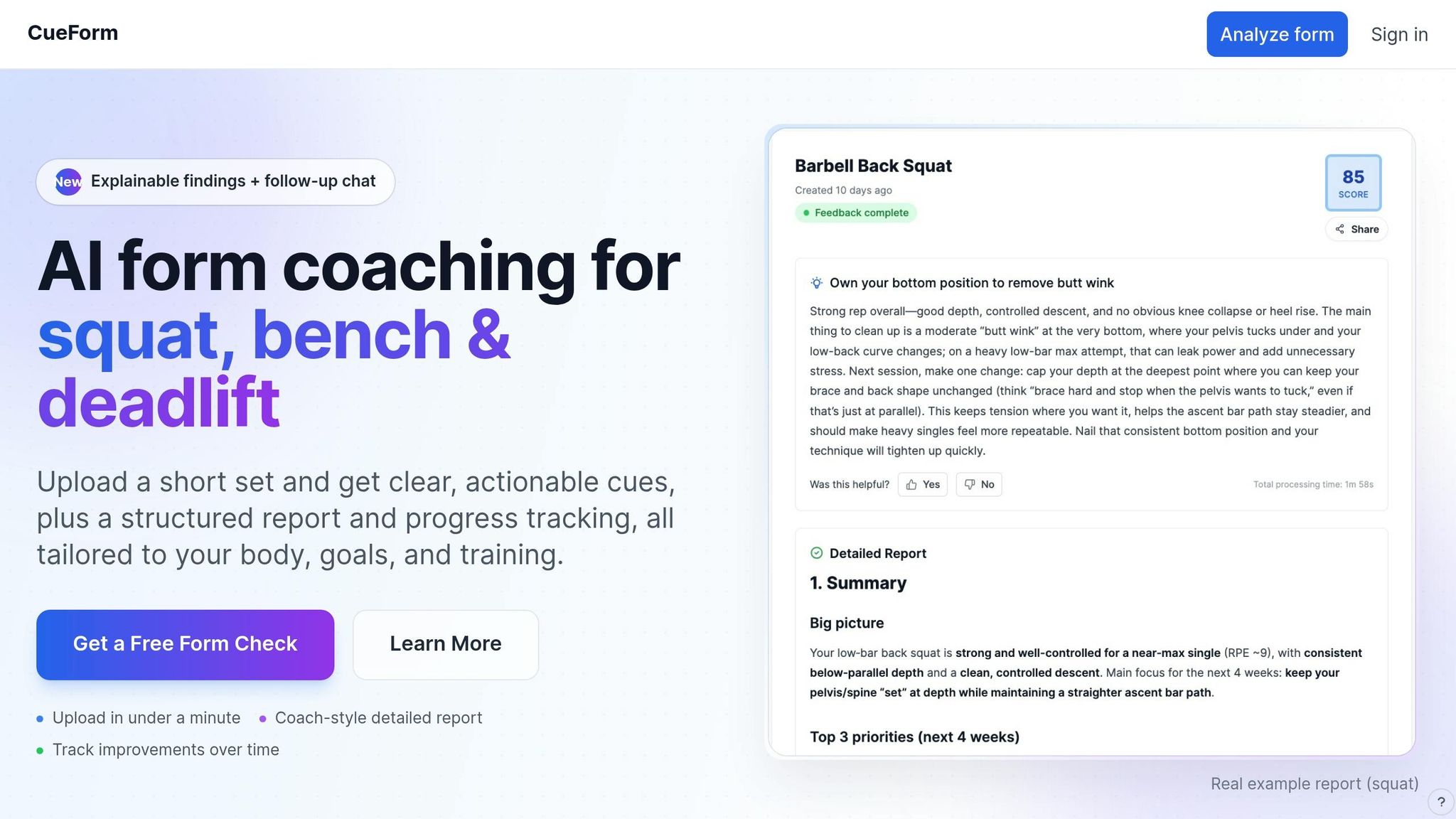
CueForm AI takes the advanced concepts of pose estimation - like keypoint detection, joint angle tracking, and diverse training data - and puts them into action for everyday lifters. It’s specifically designed to assist with the three most technically challenging barbell lifts: the squat, bench press, and deadlift.
How CueForm AI Analyzes Your Lifting Form
CueForm AI personalizes its analysis to fit your lifting routine. Here’s how it works: you pick a lift, upload a short video recorded from a clear angle, and provide personal details such as your anatomy, lifting style (e.g., high-bar vs. low-bar squat), and training goals. This ensures the feedback aligns with your biomechanics. For example, if you have longer femurs, the system recognizes that a forward torso lean during a squat is natural for you and won’t mistakenly flag it as incorrect.
The tool evaluates specific metrics for each lift:
| Exercise | Key Analysis Points |
|---|---|
| Squat | Depth assessment, knee alignment, bar path analysis, hip hinge mechanics |
| Bench Press | Bar path consistency, shoulder blade retraction, elbow positioning, touch point analysis |
| Deadlift | Hip hinge mechanics, bar path tracking, back position, lockout analysis |
What makes CueForm AI stand out is the detailed "Findings" section in its reports. Instead of just pointing out issues, it provides the exact metrics and reasoning behind its feedback. This approach bridges the gap between general advice and tailored, actionable insights.
Using the AI Coach to Refine Your Technique
Feedback only works if it’s clear and applicable. That’s why CueForm AI lets you engage directly with its AI coach. If a cue doesn’t fit your style or goals, you can say something like, "That’s not my stance", or "I’m focused on hypertrophy, not powerlifting." The AI adjusts its analysis to better match your needs, turning abstract suggestions into practical guidance. Over time, it tracks your progress - monitoring both technique scores and the weight you lift - so you can see measurable improvements.
"Add your goals, anatomy, and training plan so the feedback matches how you actually lift." - CueForm AI [4]
CueForm AI offers two pricing options: a Free plan at $0/month, which includes unlimited quick feedback and limited AI coach interaction, and a Starter plan at $10/month or $89/year. The Starter plan unlocks unlimited detailed reports and extended chat capabilities for more in-depth coaching. This blend of technology and customization is a game-changer for lifters looking to fine-tune their performance.
Conclusion: Where AI Form Coaching Is Headed
With systems capable of tracking 33 3D landmarks at an accuracy rate of 90–95% [1], pose estimation is revolutionizing how lifters receive feedback. It identifies form issues - like knee cave or back rounding - that even seasoned lifters might not notice on their own.
Edge AI is pushing boundaries by cutting feedback latency to under 200ms, enabling nearly real-time corrections [3]. This level of speed opens doors for more dynamic and responsive coaching experiences.
As latency continues to decrease, the next evolution lies in creating smarter, more integrated coaching systems. These will combine pose estimation data with wearable biometrics - such as heart rate variability (HRV), sleep patterns, and heart rate - to fine-tune training plans based on actual recovery metrics [3].
"Your AI app can calculate 'Muscle Strain' and 'Cardio Fatigue,' ensuring the user trains at the absolute optimal threshold." - Jimmy Watson, Content Writer, MindRind [3]
Tools like CueForm AI are already leading the way, offering detailed analysis for key lifts like squats, bench presses, and deadlifts. These systems use adaptive AI to provide tailored feedback. As advancements in personalized biomechanical modeling, multi-camera setups, and better occlusion handling continue to emerge [1], AI-driven form coaching is set to not only enhance performance but also boost safety and overall training efficiency.
FAQs
What camera angle works best for accurate form feedback?
For optimal form feedback, place your smartphone at hip height - or bench height if you're doing bench presses - and position it 8–12 feet away. According to CueForm AI, here are the recommended angles for different exercises:
- Squats: 45° rear oblique angle
- Deadlifts: 45° front oblique angle
- Bench presses: 45° side angle
Make sure your entire body is in the frame, the space is well-lit, and the background contrasts with your clothing for the clearest results.
How does the system handle hidden joints or bad lighting?
CueForm AI delivers its best performance when your smartphone is positioned 6 to 8 feet away in a well-lit space to minimize shadows. Its advanced vision-language models and computer vision algorithms are designed to handle obstacles like hidden joints or uneven camera angles, ensuring consistent analysis. To achieve the best results, make sure your entire body is visible in the frame so the system can accurately track keypoints.
How fast does feedback need to be to help during a rep?
Feedback during exercise needs to be almost instantaneous to be effective - within about 200 milliseconds, to be precise. This is because the brain requires 150–250 milliseconds to process a visual cue and make adjustments to movement. If feedback is delayed by even 2–5 seconds, it can result in something called negative transfer. This happens when corrections meant for a previous repetition interfere with the current one, often causing improper form or unnecessary disruptions.