AI-Powered Pose Tracking for Injury-Free Workouts
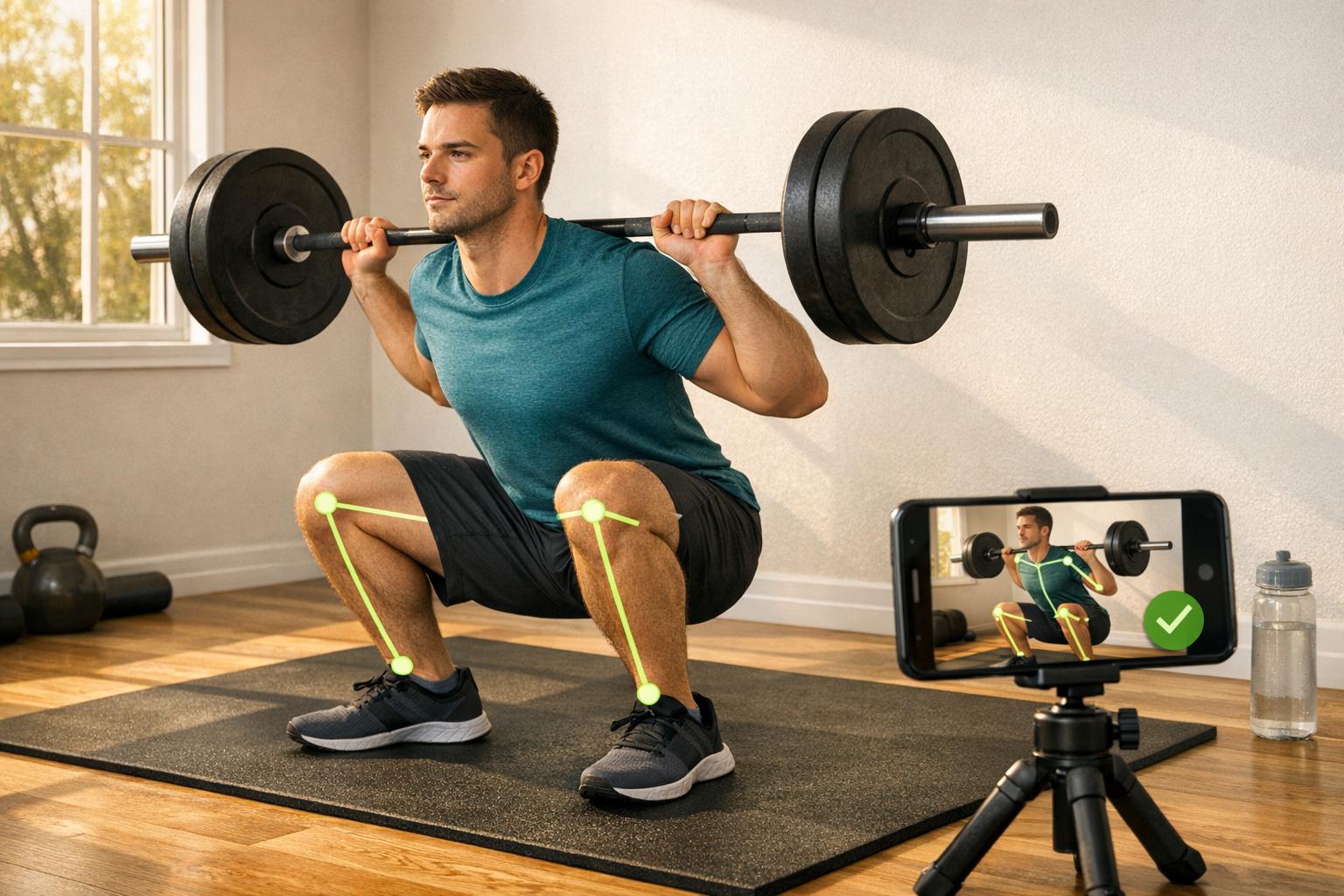
AI-powered pose tracking helps you avoid workout injuries by analyzing your form in real-time. Using tools like a smartphone or webcam, it monitors your movements, identifies errors, and provides immediate feedback to correct mistakes during exercises like squats, deadlifts, and bench presses. This technology tracks joint angles, bar paths, and alignment with high precision, ensuring safer and more effective training.
Key points:
- Real-time feedback: Corrects form instantly to prevent bad habits.
- High accuracy: Tracks over 30 joint landmarks with ±2.5° precision.
- Common issues addressed: Knee valgus, spinal rounding, flared elbows.
- Proven results: Studies show reduced injury risks and improved strength gains.
- User-friendly setup: Requires a camera, good lighting, and form-fitting clothing.
Platforms like CueForm AI specialize in analyzing strength training movements, offering tailored feedback and progress tracking. With free and affordable paid options, these tools make injury prevention accessible to everyone.
Pose Fitness App- Can Augmented Reality Improve Your Form and Workouts? Full Review & Demo
sbb-itb-c91a623
What Is AI-Powered Pose Tracking?
AI-powered pose tracking relies on computer vision and deep learning to monitor your body’s movements in real time. By identifying key joints, it compares your movements against biomechanical standards to spot errors and provide corrective feedback. Let’s dive into how this technology works to map and analyze movement with precision.
"Good form is the difference between strength and strain, yet for the fast-growing community of at-home fitness enthusiasts, expert feedback is often out of reach." - Xiaoye Zuo et al., University of Pennsylvania [5]
How Pose Tracking Works
The process begins with the AI detecting your position in the frame and then mapping 33 3D body coordinates (X, Y, Z) with incredible speed. Tools like MediaPipe Pose (developed by Google Research) and TensorFlow.js make this possible [1]. The data is processed locally, ensuring privacy and delivering feedback in as little as 28.6 milliseconds per inference [4].
Next, the system calculates joint angles and identifies deviations from proper form. For instance, during a squat, it checks if your hip crease drops below your knee. In a deadlift, it monitors your spinal angle. If your movement strays from the ideal range, the AI offers specific cues like "lower your hips" to help you adjust. This level of detail is what makes AI-powered pose tracking so effective.
Key Benefits of AI-Based Feedback
AI stands out by tracking all joints simultaneously, providing consistent and detailed analysis for every rep and set. A clinical study at Kyungwoon University followed 146 participants over 16 weeks and demonstrated the effectiveness of this approach. Using an AI resistance training program powered by MediaPipe, the system achieved 95.8% accuracy in pose classification compared to professional physiotherapists. Participants also experienced measurable improvements, gaining an average of 9.7 lbs (4.39 kg) in 1RM squat strength and reducing body fat by 2.92% during the study [4].
Unlike human trainers, whose feedback may vary, AI applies the same biomechanical standards consistently. Platforms like CueForm AI use this capability to deliver real-time, actionable feedback, helping users train more safely and effectively.
Common Form Errors in Strength Training and How AI Addresses Them
AI Pose Tracking: Common Lifting Errors & How AI Fixes Them
Improper form is one of the biggest culprits behind gym injuries - even seasoned lifters aren't immune to these mistakes. Thankfully, AI-powered tools are stepping in to provide real-time feedback, helping athletes refine their technique and avoid injuries.
Typical Form Mistakes in Strength Training
Some of the most common errors show up in three staple lifts: the squat, deadlift, and bench press. Here's a breakdown of common issues:
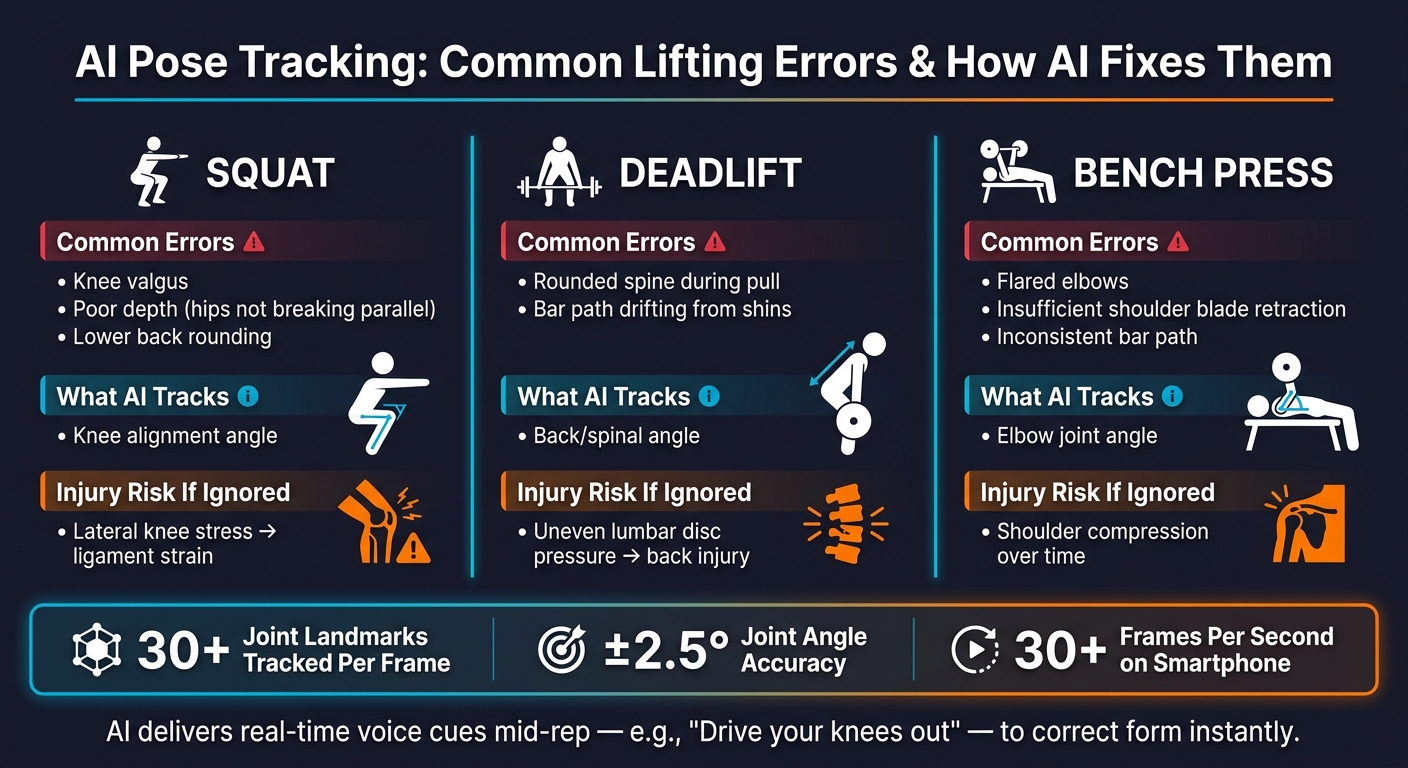
- Squat: Lifters often struggle with reaching proper depth (hips breaking parallel), experience knee valgus (knees caving inward), or round their lower back under load [2][6].
- Deadlift: A rounded spine during the pull and a bar path that drifts away from the shins are frequent problems [2][6].
- Bench Press: Common issues include flared elbows, insufficient retraction of the shoulder blades, and inconsistent bar paths from one rep to the next [2][6].
| Exercise | Common Error | What AI Tracks |
|---|---|---|
| Squat | Knee valgus, poor depth | Knee alignment |
| Deadlift | Spinal rounding, bar drift | Back angle |
| Bench Press | Elbow flare, flat shoulders | Elbow joint angle |
AI systems use pose estimation to monitor over 30 joint landmarks per frame, calculating joint angles with an impressive ±2.5° accuracy [6]. With the ability to process at 30+ frames per second on a standard smartphone [6], these tools can catch subtle deviations that are often missed by a training partner or even a coach’s watchful eye.
By identifying these issues right away, AI transforms potential problems into opportunities for immediate improvement.
How Correcting Form Reduces Injury Risk
Fixing these errors on the spot can significantly lower the risk of long-term strain and injuries. For instance:
- Squat: Knee valgus adds lateral stress to the knee joint, increasing the chance of ligament strain.
- Deadlift: A rounded back places uneven pressure on the lumbar discs, heightening the risk of serious back injuries.
- Bench Press: Flared elbows can lead to shoulder compression over time [6].
"Good form is the difference between strength and strain... Poor technique not only diminishes training effectiveness, it can also lead to serious injury." - Xiaoye Zuo et al., University of Pennsylvania [5]
AI-driven tools provide real-time feedback, like voice prompts that say, "drive your knees out", so you can make adjustments mid-rep [3][6]. Platforms like CueForm AI take it a step further by tailoring feedback to your specific movements, analyzing positions and bar paths from your video to ensure corrections are precise and personalized [2].
How CueForm AI Supports Strength Training
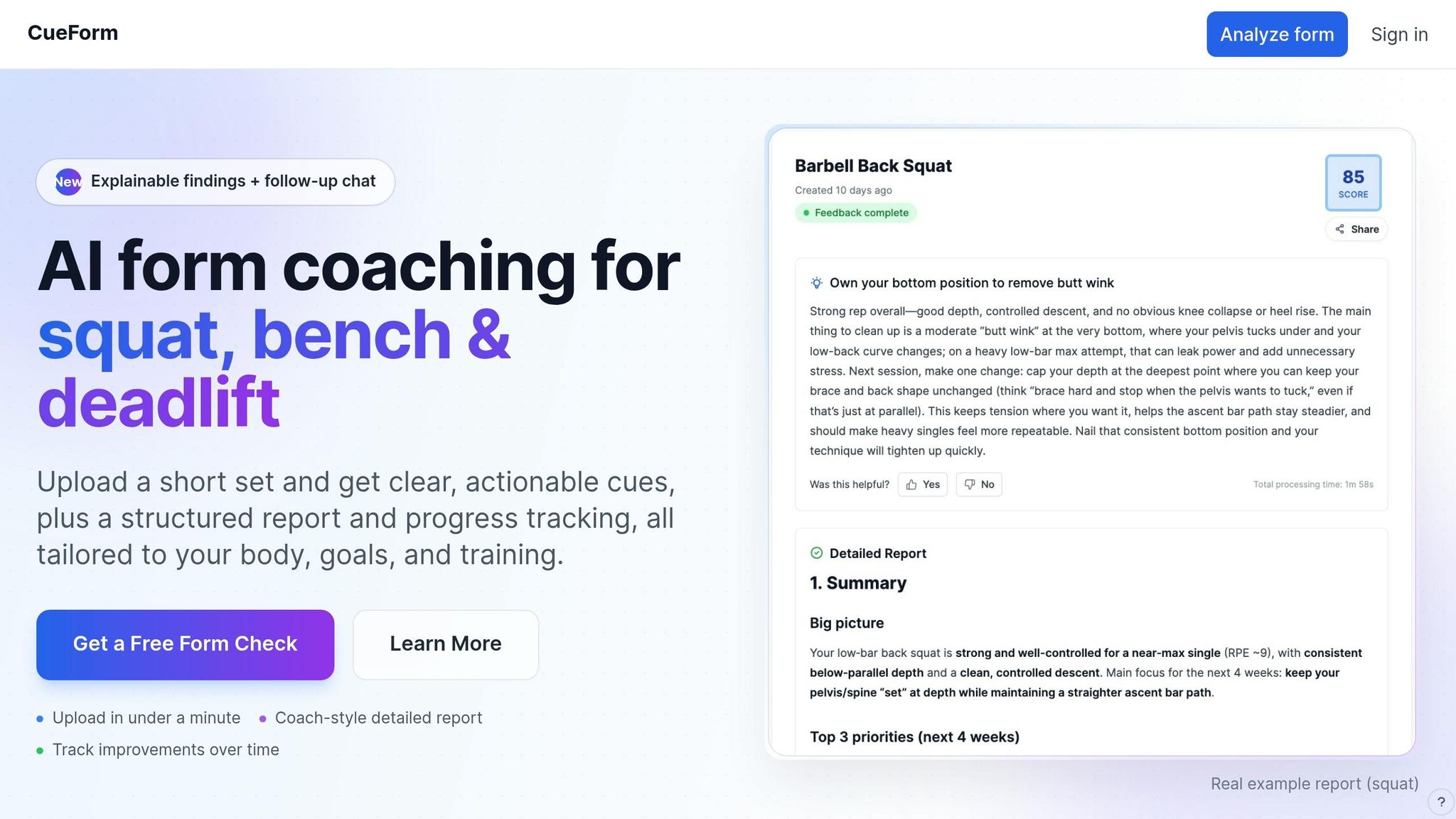
CueForm AI is designed to focus on the Big 3 lifts - squat, bench press, and deadlift. It analyzes bar path, joint mechanics, and body positions to deliver precise, lift-specific feedback.
Personalized Feedback for Each Lift
To get started, simply upload a clear-angle video along with details about your anatomy, goals, and training plan. CueForm AI then creates a detailed, movement-specific report tailored to your needs.
CueForm's "Actionable Cues" go beyond pointing out issues - they explain what to fix, why it’s important, and how it should feel. For example, instead of just identifying knee valgus during a squat, the platform breaks down its mechanical impact and provides a practical correction for your next set.
"Clear 'do this next rep' guidance - what to change, why it matters, and what it should feel like." - CueForm
The "Findings" feature adds another layer of insight by showing the exact metrics behind each cue. This eliminates guesswork, helping you understand why a specific adjustment is needed and how it can improve your form.
On top of this personalized analysis, CueForm AI offers real-time coaching to keep your progress on track.
AI Coach for Follow-Up Guidance
CueForm AI doesn’t stop at reports. It includes an interactive AI coach you can chat with immediately after receiving your feedback. Whether you’re looking for alternative suggestions or wondering, “What should I feel at the bottom of a squat?”, the AI coach is there to assist.
This conversational feature allows you to fine-tune feedback to match your stance, goals, or training style. Plus, progress tracking monitors your technique scores and load over time, making it easy to see measurable improvements.
With its combination of detailed reports and instant coaching, CueForm AI helps ensure you maintain safe and effective technique - key for avoiding injuries.
CueForm AI offers a free tier with unlimited quick feedback and findings. For deeper insights, the Starter plan is available at $10 per month or $89 per year, giving you access to unlimited detailed reports and extended chat capabilities with the AI coach.
How to Choose a Pose-Tracking Platform
Pick a platform that matches your lifting style, the level of feedback detail you want, and your setup preferences.
Features to Look For
When selecting a pose-tracking platform, consider how well it aligns with your goals and training style. Here are some key features to evaluate:
- Actionable feedback: Opt for platforms that go beyond raw data like joint angles. The best tools explain what needs to be fixed, why it matters, and how it should feel during the lift.
- Exercise specificity: Some platforms focus on general fitness, while others specialize in specific lifts like squats, bench presses, or deadlifts. Specialized platforms often provide more precise and relevant cues for those movements.
- Risk and trend detection: A good platform should highlight early signs of issues like imbalances, compensatory movements, or fatigue before they lead to injuries.
- Progress tracking: Look for tools that track technique scores and load progression over time, helping you see if your form is improving.
- Explainability: The platform should break down the metrics behind corrections instead of offering vague feedback.
- Interactive follow-up: Platforms with AI chat features allow you to ask clarifying questions, such as, "What should I feel during this movement?" This can be especially helpful if a cue doesn’t immediately make sense.
Take advantage of free trials to test whether the platform meets your specific lifting and feedback needs.
Setup and Recording Requirements
For accurate tracking, camera placement and setup are crucial. Position your camera at a side-on or 45-degree angle, as a straight-on view often misses important details like depth and bar path. Ensure the area is well-lit with bright, even lighting, and avoid shadows or backlighting. The camera should be stable and placed 6–8 feet away. Wear form-fitting clothing to ensure your joints are visible; baggy clothes can interfere with tracking accuracy.
Providing context - such as the specific lift, your goals, and your training plan - helps the platform tailor its analysis to your needs instead of offering generic advice.
| Requirement | Recommendation |
|---|---|
| Distance | 6–8 feet from the camera |
| Angle | Side-on or 45-degree (depending on the lift) |
| Lighting | Bright, even; avoid shadows or backlight |
| Clothing | Form-fitting; avoid loose attire |
| Clip length | Keep it under one minute per set |
Conclusion: Using AI to Train Safer and Smarter
Improper technique is responsible for a staggering 60% of gym injuries [8], with many starting as minor issues that gradually worsen over time. AI pose tracking steps in to address this by identifying subtle flaws in form - like knees caving in or an overly rounded spine - before they lead to bigger problems.
One of AI's standout benefits is its ability to deliver consistent, objective feedback on every rep. By analyzing joint angles, flagging risky movements, and reinforcing proper mechanics, AI tools can lower the risk of injury by up to 25% [7] and enhance training performance by 20–40% [7]. Real-time corrections ensure safer workouts while helping you build better habits. This kind of precise feedback not only improves your performance but also protects your long-term physical health.
That said, AI is here to assist, not replace, your personal judgment. For lifts like squats, bench presses, and deadlifts - where form is absolutely critical - an AI tool like CueForm AI could be a game-changer. With a free plan that offers unlimited instant feedback, there’s no excuse not to give it a shot.
The key takeaway? Use AI as a helpful guide, not a crutch. Learn to recognize what proper form feels like and aim to replicate it independently. When used this way, AI doesn't just make your training safer - it makes it smarter.
FAQs
How accurate is pose tracking with just a phone camera?
AI-powered pose tracking using a smartphone camera delivers impressive accuracy, measuring joint angles within just 3–5 degrees of lab-grade systems. It also excels in tasks like exercise classification and repetition counting, often reaching accuracy levels of 90–97%.
For the best results, position your device about 6–8 feet away, ensuring your entire body is visible and well-lit. Diagonal or frontal angles are ideal, especially for compound exercises like squats.
What camera angle works best for squat, bench, and deadlift videos?
For the best results with CueForm AI, position your smartphone at torso height and keep it about 6–8 feet away. Choose either a diagonal or frontal angle to ensure your entire body is visible during each repetition. Make sure the area is well-lit, the camera is stable, and the background contrasts with you to improve detection accuracy.
Can AI feedback replace a coach for injury prevention?
AI feedback works as a partner to human coaches, not as a substitute. Tools like CueForm AI deliver consistent, real-time analysis and can spot biomechanical errors that might slip by unnoticed. On the other hand, human coaches bring a deeper understanding of individual factors like pain history, stress, and recovery needs. The ideal approach blends AI's accurate, data-focused insights with a coach's tailored expertise to fine-tune techniques and help lower the risk of injuries.
Related Blog Posts
Plans
Choose the plan that best fits your needs.
Free
Try it out
Starter
Perfect for fitness enthusiasts