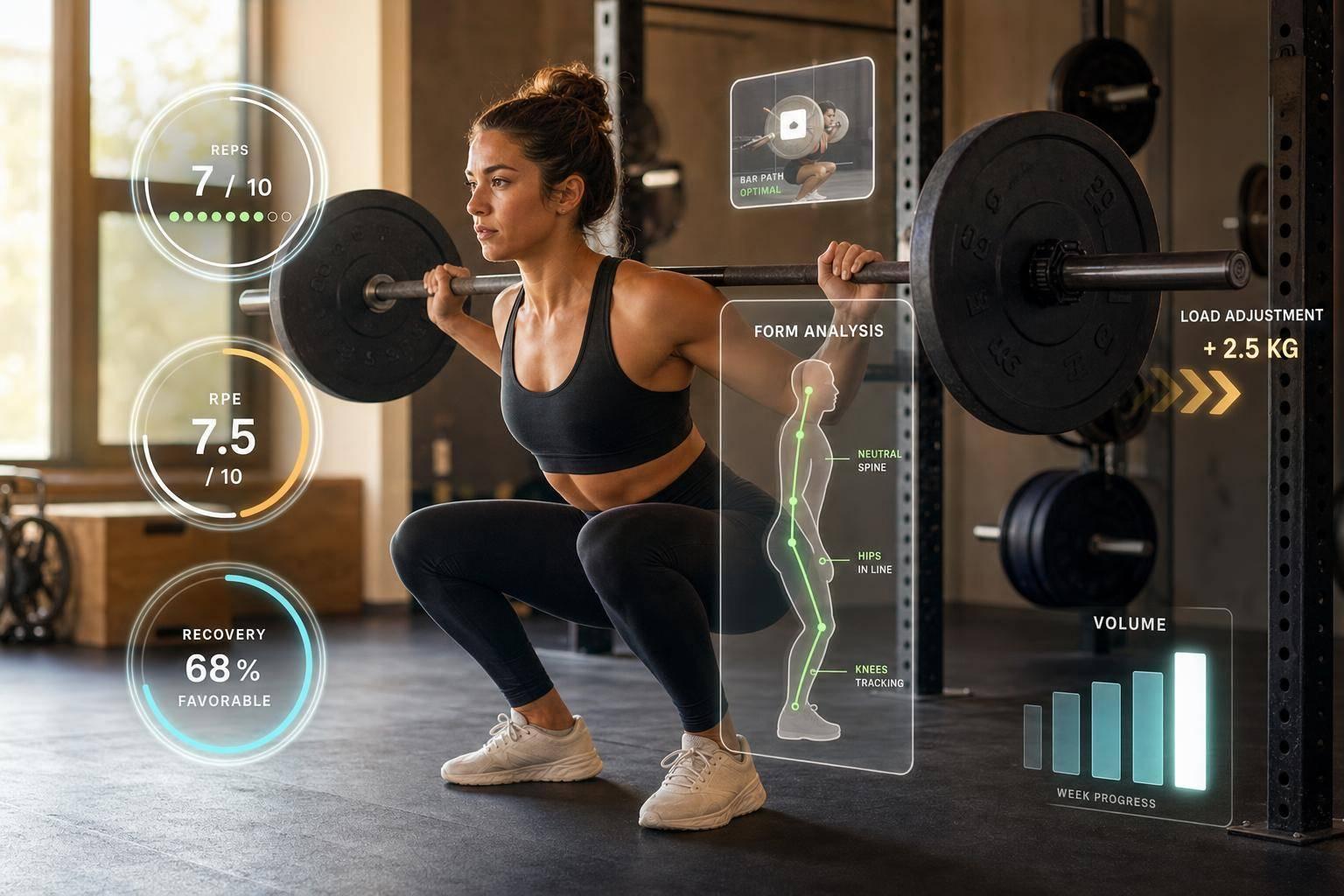
How AI Adjusts Workouts for All Levels
AI changes workouts by looking at your last session, your form, and your recovery instead of following a fixed plan. In practice, that means a beginner may get slower load jumps and simple form cues, an intermediate may get rep-based progress and lift variations, and an advanced lifter may get tighter fatigue control.
Here’s the short version:
- Generic plans miss day-to-day changes. They often tell you to add weight even when sleep, soreness, or form say otherwise.
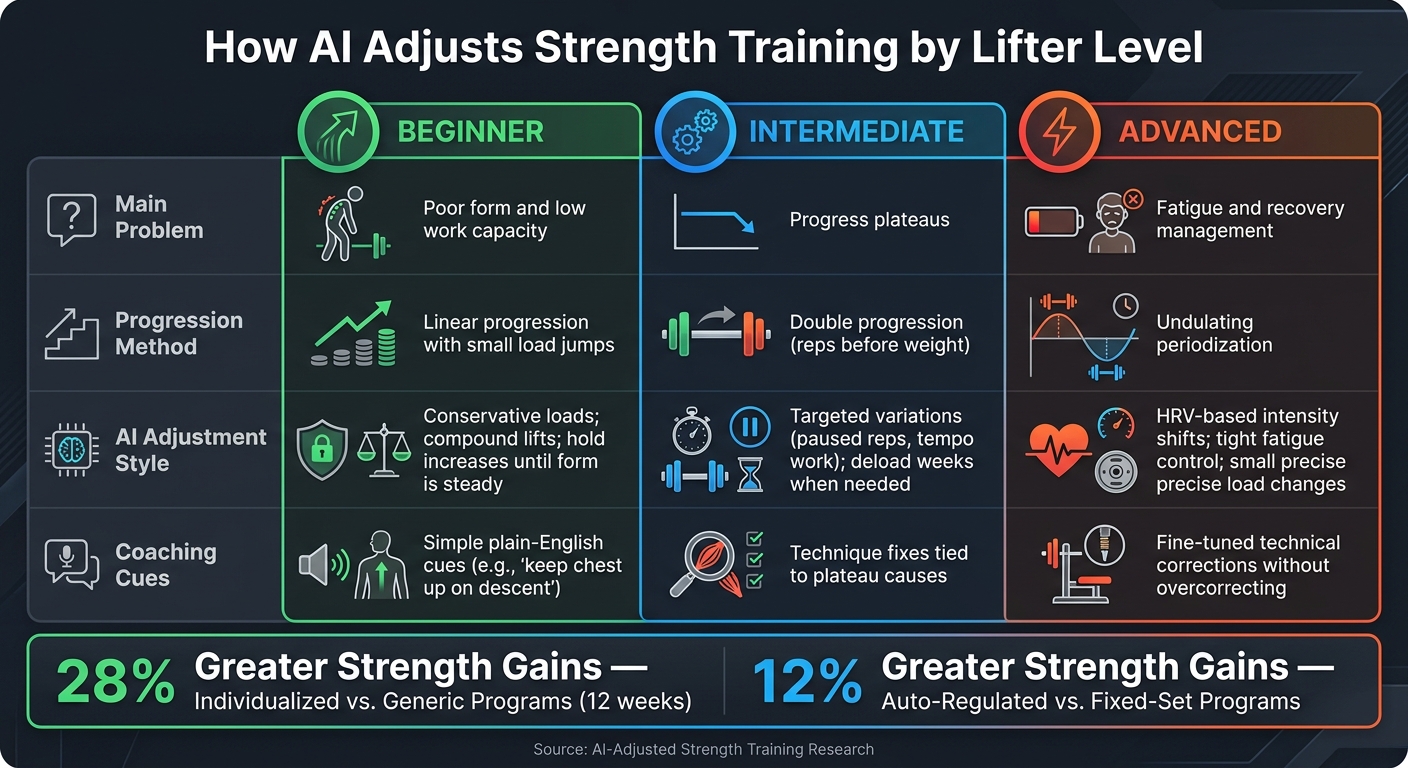
- Personal plans work better. The article cites 28% greater strength gains over 12 weeks for individualized programs and 12% greater gains for auto-regulated training vs. fixed-set plans.
- AI looks at both numbers and movement. It uses load, reps, RPE/RIR, workout history, and video checks on squat, bench, and deadlift.
- It changes four main things: weight, sets/reps, exercise choice, and form cues.
- Your level matters. New lifters need simple progress and cleaner reps. Mid-level lifters need help when progress stalls. Advanced lifters need tight control over fatigue and recovery.
- Bad input leads to bad output. If your logs are off or your video is poor, the next workout can be off too.
- AI is not for pain or medical issues. If you have joint pain, post-surgery limits, or a health condition, I’d treat that as a job for a coach, physical therapist, or doctor.
If I had to sum up the full article in one line, it would be this: <u>AI helps most when it adjusts training to what you can do today, not what a fixed template expected last week.</u>
The Problem with Generic Strength Programs
A generic strength program can't react to bad sleep, joint stiffness, or a rep that looked shaky. It just says: add 5 lbs next week. That's where a lot of plans start to fall apart [3].
Why Each Training Level Needs Different Inputs
Training age changes the game. Beginners can usually handle bigger jumps. Intermediates need smaller, more flexible increases. Advanced lifters often need tiny load changes and much closer fatigue control across the whole body.
That difference matters because strength and tissue adaptation don't move at the same speed.
Strength can improve faster than tendons and ligaments do. As Jordan Feigenbaum, MD, MS, of Barbell Medicine, puts it:
"A progression model that chases the fastest adaptation [neural] can exceed the tolerance of the slower systems [connective tissue]." - Jordan Feigenbaum, MD, MS, Barbell Medicine [1]
Where Fixed Templates Fall Short
Fixed templates run on a simple rule: hit the reps, add weight. The problem is that they don't care how those reps got done. A beginner might grind through five squats with a knee caving in and the torso tipping forward. On paper, the set counts. In practice, the lift was messy. A static plan still tells that person to go heavier next time [3].
Day-to-day performance also swings more than many lifters think. For a 500-pound squatter, daily output can shift by about 25 pounds in either direction [1]. A fixed plan has no way to deal with that. It gives you the same load whether you feel sharp and rested or you're dragging from bad sleep and stress [3].
This is where auto-regulation starts to separate itself. Auto-regulated training programs produce 12% greater strength gains than fixed-set programs [5]. That gap isn't about trying harder. It's about the plan reacting to what's happening in the gym, in your body, and on that day's reps.
For advanced lifters, the problem gets even tougher. They can't push every muscle group forward at the same time, and recovery becomes a tradeoff. A fixed template can't juggle that well. Data-driven adjustment can. And that's the opening AI steps into: it reads performance and form signals instead of forcing the same rule on everyone.
sbb-itb-c91a623
How AI Uses Training Data and Form Analysis to Adjust Workouts
AI blends performance data with video to adjust the next workout. So instead of guessing, it works from what just happened in training. The main thing to understand is which signals it reads and how those signals shape the next session.
Performance Signals: Load, Reps, RPE, and Progress Trends
AI looks at load, reps, and RPE to judge readiness and spot stalled progress or weak recovery. If your RPE starts climbing on weights that used to feel easy, the system can treat that as a recovery warning and change the plan.
That might mean holding the weight where it is instead of forcing an increase. Or it may mean adding only 5 to 10 lb rather than making a bigger jump. And it doesn’t overreact to one bad day. It checks for patterns across several sessions before changing the plan in a major way.
Movement Signals: Video Analysis for Squat, Bench, and Deadlift
Numbers tell you what you lifted. Video shows how you lifted it.
With video tracking, AI watches bar path and body position, then compares them with solid movement ranges. The output isn’t vague. It gives you a cue you can use on the very next rep, like:
- "spread the floor with your feet"
- "drive your hips forward at lockout"
- "lower your hips 2 inches"
That kind of real-time feedback helps lifters fix technique before mistakes turn into habits. It makes each workout feel more like a live tutorial than a simple list of sets and reps. CueForm AI does this for the squat, bench press, and deadlift by reviewing uploaded videos and sending back clear cues along with the supporting metrics.
How AI Turns Data into Workout Adjustments
Here’s how that plays out across the main inputs:
| Metric Tracked | How AI Uses It | Benefit for the Lifter |
|---|---|---|
| Estimated 1RM | Sets baseline intensity for strength vs. hypertrophy phases | Keeps loads workable |
| RPE / RiR | Adjusts the weight for the next set or session | Matches load to readiness |
| Bar Path / Depth | Generates specific cues (e.g., "lower hips 2 inches") | Improves technique |
| HRV / Sleep | Triggers volume reductions on low-recovery days | Cuts fatigue |
| Workout History | Identifies plateaus and rotates exercise variations | Keeps progress moving |
When bar speed drops in the middle of a set, AI can spot hidden fatigue before form fully breaks down. Then it can suggest a load drop or a safer exercise swap instead of waiting for a missed rep. Those changes won’t look the same for every lifter, though. Training level matters.
How AI Changes Coaching by Training Level
How AI Adjusts Strength Training by Lifter Level
Once AI reads the signals, the next step is matching the response to the lifter’s training level. Those signals only matter if the system changes the plan for the person in front of it. That means not just load changes, but also coaching cues, exercise swaps, and how fast progression moves.
Here’s how that tends to look at each level:
| Lifter Level | Main Problem | AI Adjustment |
|---|---|---|
| Beginner | Poor form and low work capacity | Linear progression; simple cues; mostly compound lifts |
| Intermediate | Progress plateaus | Double progression; targeted variations like paused reps or tempo work |
| Advanced | Fatigue and recovery management | Undulating periodization; HRV-based intensity shifts |
Beginners: Conservative Loads and Clear Form Cues
For beginners, AI keeps things simple on purpose. It leans on mostly compound lifts, adds weight in small jumps, and holds off on load increases until movement quality stays steady. The cues are plain and direct, like: keep your chest up on the descent.
This is where video analysis helps early. CueForm AI lets beginners upload squat, bench press, or deadlift videos and get back specific, plain-English corrections tied to what the video shows. For new lifters, that kind of feedback can catch setup and movement mistakes before they turn into habits. At this stage, the goal isn’t faster progress. It’s cleaner reps that can support progress later.
Intermediates: Breaking Plateaus with Load and Technique Changes
Intermediates usually hit a wall when linear progression runs out of steam. AI responds by shifting to double progression, building reps before adding weight, and adding targeted variations like paused reps or tempo work to fix weak points. It also looks at training history to figure out why progress stalled, not just that it stalled.
If the lifter logs RPE or RIR honestly after each set, the system has the data it needs to decide when to add load or when to slot in a deload week to lock in gains. When progress slows, the system should explain the change, such as adding volume after strong load progression [2]. At this level, AI tweaks the plan to keep things moving without forcing bigger jumps than the lifter can handle.
Advanced Lifters: Fatigue Control and Precise Technical Corrections
Advanced lifters deal with day-to-day swings in performance. They also have less room for error, which means small load changes carry more weight.
AI handles this with undulating periodization and, when wearable data is available, HRV-based intensity shifts. Syncing a device like an Apple Watch, Oura Ring, or Garmin lets the system automatically pull intensity down on low-recovery days [6]. At this level, AI fine-tunes instruction without overcorrecting. It adjusts fatigue and intensity so the lifter can keep progressing without pushing too hard during heavy weeks. Here, small shifts in fatigue and intensity matter more than bigger jumps in load.
What AI Actually Changes in a Strength Workout
AI changes a few core parts of a workout from one session to the next: load, volume, exercise choice, and coaching cues. In practice, those changes tend to fall into four main buckets.
| Training Parameter | How AI Adjusts It | Data Used |
|---|---|---|
| Load (Weight) | Increases by small increments, holds steady, or reduces mid-session | Reps completed, RPE/RIR, bar speed, historical trends [4][3] |
| Volume (Sets/Reps) | Adds or removes sets; shifts rep ranges (e.g., 5x5 to 3x10); trims accessories 20–30% on low-recovery days | Training age, fatigue levels, workout length [9][6] |
| Exercise Variation | Swaps movements or progresses to a more challenging variation based on recovery or flagged risk | Equipment availability, injury history, muscle recovery [7][10] |
| Technical Cues | Delivers specific prompts like "spread the floor" or "chest up" based on detected movement errors | Computer vision, joint angle tracking, video analysis [4][6] |
Load Selection and Weight Increases
When a lifter keeps hitting their rep targets and form stays steady, the system adds a small jump, usually 2.5 to 5 lb [4][3]. If RPE climbs into the 9–10 range, the AI keeps the weight where it is or pulls it back. In other words, the load moves with performance, not with some fixed weekly schedule.
Volume, Exercise Variations, and Technical Cues
When load stops moving, AI will often cut volume first. If recovery markers look poor, accessory work is usually the first thing to go. That can mean cutting accessory sets by 20–30% before changing the weight on main lifts [8].
Exercise swaps work in much the same way. If a movement pattern gets flagged as higher risk, or form keeps falling apart under load, the system may swap in a safer variation.
Technical cues are even more direct. A video error in one set can turn into a single cue for the next one. CueForm AI, for example, turns lift video into one specific cue for the next session.
None of this works if the input data is off.
The Limits of AI Workout Adjustment
AI can do a lot, but it’s only as good as the data you feed it. That’s the trade-off. If you know where it falls short, you can use it better - and you’ll know when to put the app down and get a human involved.
Poor Input Produces Poor Adjustments
Every adjustment starts with your logs. If your RPE ratings are off or your workout history is missing details, the plan gets shakier and can push your training in the wrong direction [6].
The same problem shows up with video analysis. If the camera doesn’t capture your full body, wobbles during the set, or uses poor lighting, the system has less to work with. Joint position, bar path, and movement quality can all be misread. In plain English: bad data leads to bad advice.
And one rough workout doesn’t always mean much. Sometimes a bad session is just a bad session, not proof that your whole program needs to change.
"A given program can work or fail at any level of training advancement. The variable that determines which is whether the training load is appropriate for the lifter in front of you." - Jordan Feigenbaum, MD, Barbell Medicine [1]
When a Human Coach or Medical Professional Is the Right Call
Pain, injury, and medical recovery are a different category. At that point, you’re no longer just tweaking training. You’re dealing with clinical judgment.
AI can’t assess pain that it can’t detect, and it can’t examine a medical issue. If you have persistent joint pain, you’re coming back to lifting after surgery, or you’re managing a chronic condition, your first call should be a physical therapist or physician - not an app [6][11].
The same goes for peaking, meet-day calls, and live coaching in the moment. If something feels off in your body, that’s your cue to bring in a person. That line matters. AI can adjust training, but it can’t step into decisions where health is on the line.
Conclusion: Where AI Helps Most and What to Expect
Once you see where AI misses the mark, its upside becomes pretty simple: it shapes training around the lifter, not a one-size-fits-all template. Generic strength plans often fall apart because they assume everyone starts in the same place and moves forward at the same pace. AI works differently. It recalculates your plan based on recent training data instead of sticking to a fixed script.
There’s a catch, though. The output is only as good as the input. If your logs are sloppy or your videos are off, AI has less to work with. It can only adjust well when the data you give it is accurate.
For form work, CueForm AI reviews squat, bench, and deadlift videos and gives you specific cues.
Key Takeaways for Lifters
AI can adjust load, volume, and technique cues based on where you are now, not where a template says you should be:
- Beginners get cautious progressions and clear form guidance.
- Intermediates get smarter changes that can help push past plateaus.
- Advanced lifters get tighter fatigue control and more exact technical fixes.
Log your training on a regular basis, upload clear videos, and report how recovery is going. Better data leads to better adjustments [4][10].
FAQs
How does AI know when to increase or reduce weight?
AI adjusts weight by tracking your performance and readiness in real time. It looks at your sets, reps, weight, bar speed, and effort, like RPE, to judge whether you’re on target.
If you keep hitting your reps with good form, it bumps the weight up. If you miss reps, log high effort, or show low readiness because of fatigue, sleep, or heart rate variability, it keeps the load where it is or brings it down.
What data should I track for accurate AI workout adjustments?
Track data in three areas: user profile, training history, and readiness.
The user profile should include body weight, height, training experience, past injuries, and goals. This gives the system a clear starting point. A beginner coming back from a shoulder issue should not be treated the same way as an experienced lifter chasing a new PR.
The training history should cover exercises, sets, reps, weights, and RPE. That’s the nuts-and-bolts record of what the person has actually done in the gym. Without it, any adjustment is just a guess.
The readiness side should track sleep, energy, soreness, and HRV. These signals help show how prepared someone is for training on a given day. If sleep is poor and soreness is high, pushing hard may be the wrong call.
If available, video analysis of joint positions and bar path can also help the AI monitor form progress and adjust with more precision.
Can AI coaching help if my form keeps breaking down?
Yes. AI coaching can help when your form starts to slip, especially on the squat, bench press, and deadlift.
CueForm AI looks at your technique and flags issues like knee collapse, a rounded back, or elbow flare. Then it gives you personalized, clear cues you can use right away.
You can also chat with an AI coach to fine-tune those cues around your body, your goals, and how you like to lift.
Related Blog Posts
Plans
Choose the plan that best fits your needs.
Free
Try it out
Starter
Perfect for fitness enthusiasts